
It’s easy to think scam emails only target the unsuspecting or the unprepared. But the truth is, no one is immune. Even organisations like ours, whose very mission is to raise awareness about scams, receive these attempts regularly.
Just this week, an email landed in our inbox claiming to be from Squarespace, the service we use to manage our domain. The subject? A dire warning that our domain had “expired” and we needed to act immediately to avoid losing it.
Let’s break down why this message was a scam – and the clues you can look for next time something suspicious appears in your inbox.
1. The Sender’s Email Address
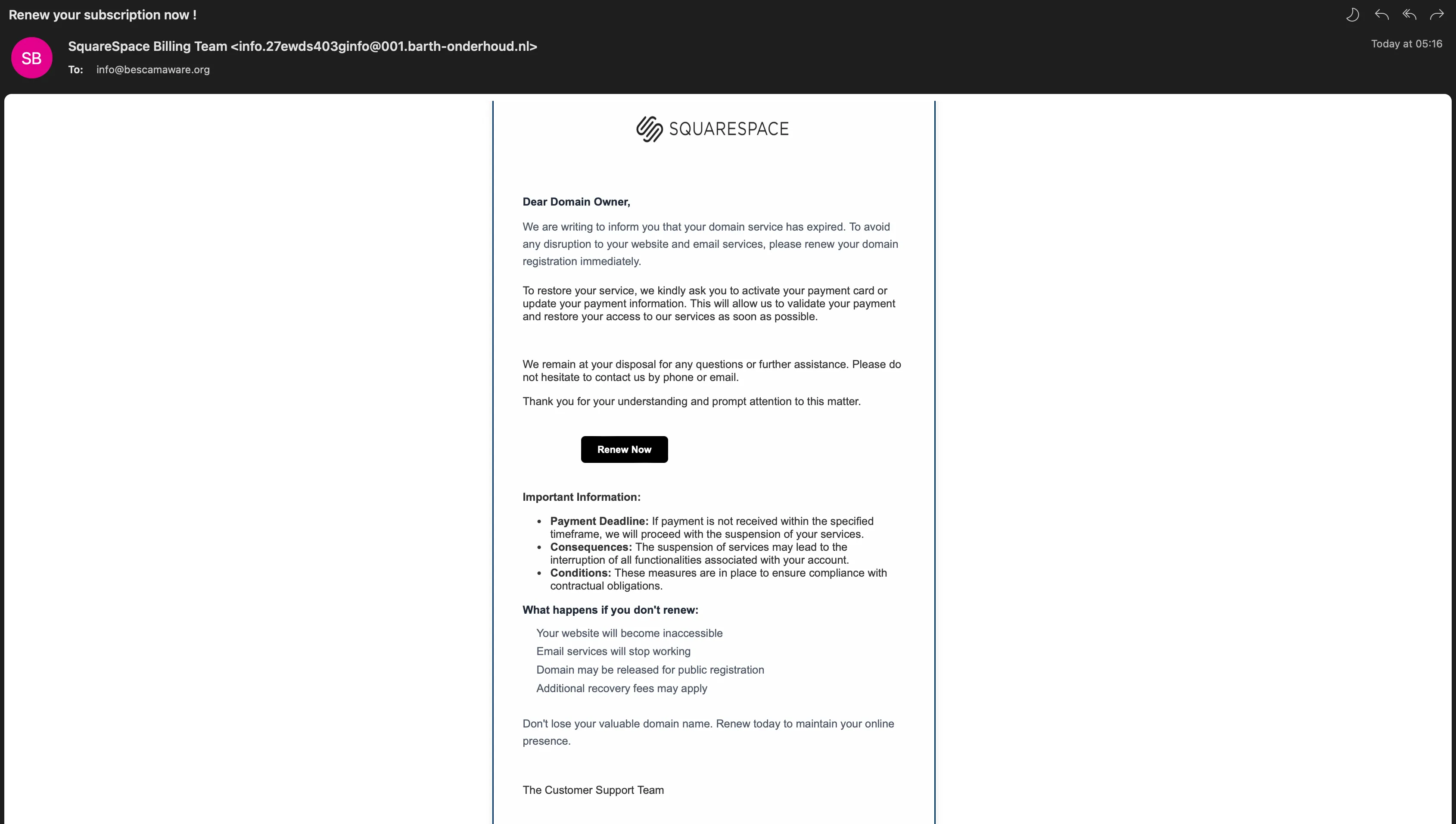
At first glance, the message claimed to come from “SquareSpace Billing Team”. But the actual email address told the real story:
info.27ewds403ginfo@001.barth-onderhoud.nl
- Squarespace is a US-based company – so why is the email address using a strange Dutch domain?
- Reputable companies use official, recognisable domains for their emails (e.g., @squarespace.com).
If the “from” address looks unusual or doesn’t match the organisation’s legitimate domain, that’s a major red flag.
2. The Urgent Call to Action
The email wasted no time pushing us to click their “Renew Now” link. The language was urgent:
“…your domain service has expired… renew your domain registration immediately.”
This is a classic pressure tactic. Scammers want you to panic, skip critical thinking, and click before you have time to double-check.
3. The Suspicious Link
The “renew” button linked to:
https://servicieorenew.com/?H38X=Y28HD
That’s not a Squarespace domain. In fact, it’s deliberately made to look vaguely “official” while actually leading somewhere dangerous. Hovering over a link before clicking is an easy way to see where it really leads.
4. The Consequences List
The email listed dramatic consequences if we didn’t act:
- Website inaccessible
- Email services stopped
- Domain released to the public
- Extra recovery fees
While some of these might be true if a legitimate domain really did expire, scammers exaggerate to create a sense of doom and push you towards quick action.
5. The Overall “Feel”
Scam emails often feel just slightly “off”. In this case:
- Overly formal, yet oddly clunky wording
- Generic “Customer Support Team” sign-off
- Vague contact details
Legitimate businesses tend to use consistent branding, professional tone, and clear contact information.
The Takeaway
Scams like this are everywhere – and even scam awareness organisations get them. The key is not to panic, to check details carefully, and to know the warning signs:
- Strange sender addresses
- Urgent language
- Links to unfamiliar domains
- Generic, vague communication
If you get something like this, don’t click. Go directly to the official website by typing the address into your browser, or contact the company through their verified channels.
Remember – it’s not about never receiving scam emails. It’s about recognising them and staying one step ahead.